
Signal Monitor
Beacon
Monitor your signal without changing it.
Watch levels, spectral events, and channel health without changing a single sample.
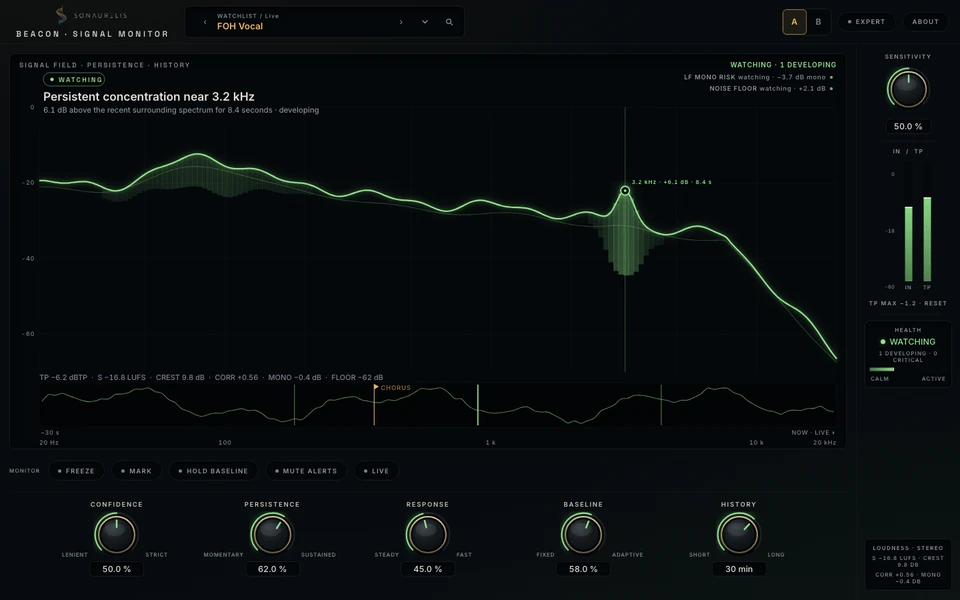


Reference render · BeaconImage preview · no audio processing
The display
Signal events, with context.
A spectrum with persistence and history puts developing events in context. Measurements, duration, and confidence make an observation readable.
Contextual observations and inferences stay at Attention or below. Red is reserved for verified critical technical faults; inferred events state their confidence.
- Bit-transparent, zero-latency audio path
- Six detector families, with individual sensitivity
- Live view for quick checks during a performance
- Free for everyone; no email required
Controls
Tune how Beacon observes the signal: the evidence required, the duration, the response, the baseline, and the history.
ConfidenceLenient ↔ Strict
How much evidence an event needs.
PersistenceMomentary ↔ Sustained
How long an event needs to last.
ResponseSteady ↔ Fast
How quickly the field follows the signal.
BaselineFixed ↔ Adaptive
The reference used to interpret the signal.
HistoryShort ↔ Long
How much of the recent timeline remains visible.
Expert controls
Set the watchlist.
- Level & technicalclipping · DC · channel faults
- Resonance & feedbackspectral concentration · feedback risk
- Dynamics & stereocrest · correlation · channel health
Expert controls stay available for automation and presets.
Live view
Monitor during a performance.
Headroom, channel health, feedback watch, and your last mark in a view made for quick glances. Mark a moment and return to it after the take.
Metering
Levels, loudness, and stereo health.
Input and true-peak meters sit beside loudness and stereo measurements. A health module brings developing and critical event counts together, so a reading always has context.
- Price
- Free — for everyone, forever
- Platform
- macOS · Apple Silicon
- Formats
- Standalone app · AUv2 · VST3
- Audio path
- bit-transparent · zero latency — never altered
- Default controls
- Sensitivity · five macros · monitor rail
- Full set
- watchlist drawer — six detector families
- Privacy
- no cloud · no accounts · no telemetry